
Important setting for Crowd 4.3.0 and newer
What changes in Crowd 4.3.0 and newer
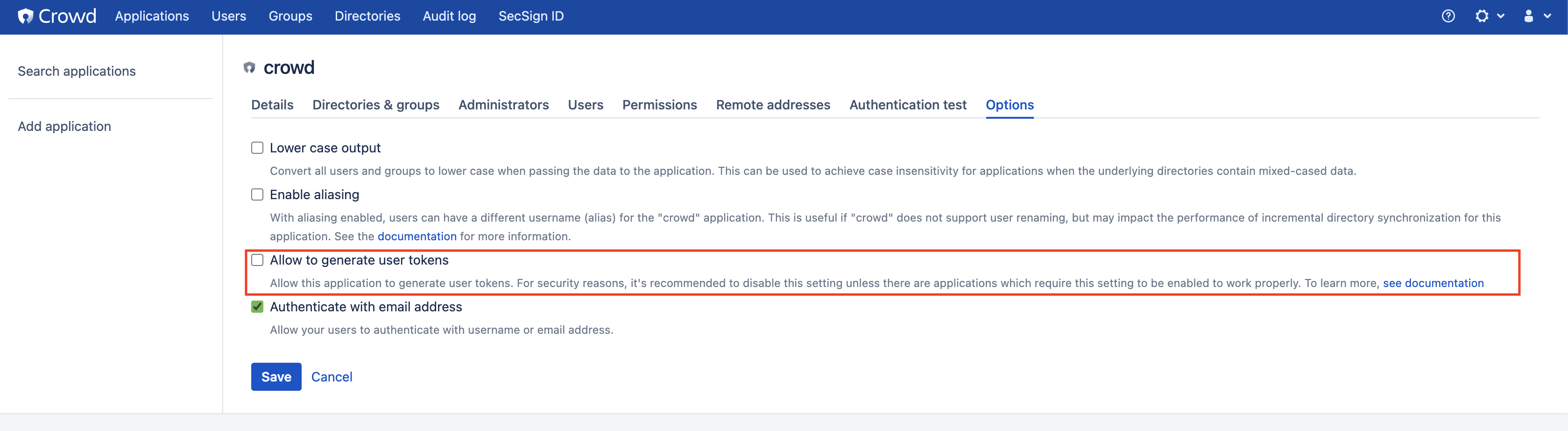
With version 4.3.0 of Crowd Atlassian introduces a new feature ‘Allow to generate user tokens’, which can be set for every application in Crowd.
By default this option is deactivated.
This prevents that Applications can login users and create SSO Token for them. Especially creating SSO-Tokens without a password is deactivated by this option.
The SecSign Add-Ons for Atlassian products check the password of a user in the first step of the Two-Step-Authentication and do not store it for further authentication steps, as this would introduce unneccessary insecurity.
In the second step, after successfully authenticating with SecSign ID, FIDO, TOTP or MailOTP, the user is then logged in without password and the SSO-token is created ( if set ).
The second step is blocked by the new option, so a login is only possible with username and password, if the option stays deactivated.
As the Crowd Console is an application in Crowd itself, a login to Crowd also is only possible with username and password.
What can I do?
For the Crowd Console
As a consequence after the update to a version higher or equal to 4.3.0 you have to:
- be able to login with an admin user with just username and password or have to disable the add-on temporarily
- in the Crowd Console navigate to ‘Applications’
- choose application ‘crowd’
- switch to tab ‘Options’
- activate the option ‘Allow to generate user tokens’ and confirm the dialog
- save the settings by clicking on ‘Save’
After that the login should work as before. So you are able to use SecSign ID, FIDO, TOTP and MailOTP again.
For SSO 2.0
In case you use other Atlassian applications with SSO 2.0 (redirect of Login to Crowd), that is all you have to do.
For Normal SSO
If you use other applications with normal SSO and the SecSign Add-On you also have to activate the option for this applications in Crowd, as described above.
Further questions
If you have any further questions or problems occur, just contact the support and we will help you with your topic.

Contact Us
Sales
Want to learn more about SecSign’s innovative and highly secure
solutions for protecting your user accounts and sensitive data?
Use our contact form to submit your information, and a SecSign sales representative will contact you within one business day.
Product Support
If you need assistance with an existing SecSign account or product
installation, please see the FAQs for more information on the most common questions. You don’t find the solution to your problem? Don’t hesitate to contact the
Product Support
I am Interested in